5 Best Blu-ray External Drives for Burning and Playback in 2026
As an Amazon Associate, this website earns from qualifying purchases.
The short answer
For most people, a slim USB Blu-ray burner with BDXL and M-DISC support is the right blu ray external drive. It reads and writes Blu-ray, DVD and CD. Plan on separate software to play Blu-ray movies, and treat 4K movie playback on a PC as a special case.
A blu ray external drive adds a disc drive to a laptop or desktop that no longer has one. It can back up files to Blu-ray discs, rip or burn DVDs, and play Blu-ray movies with the right software.
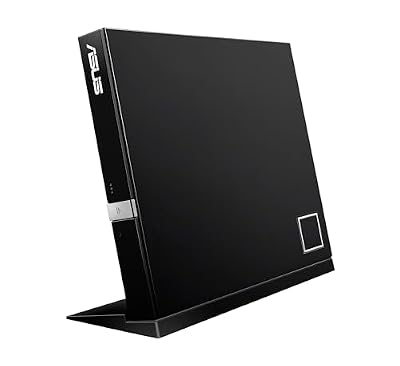
#1. ASUS SBW-06D5H-U Slim Blu-ray Burner: best all-round slim burner
USB connection. Older slim drives use USB 2.0, which tops out at 480 Mbps. Newer ones use USB 3.x and often USB-C. A faster link helps with large backups.
BDXL support. BDXL is the format for 100GB triple-layer discs. A drive without it cannot write them. Our guide to the highest capacity Blu-ray disc explains the capacity tiers.
M-DISC support. M-DISC media are made for long-term archiving. Look for M-DISC on the listing if backups are your main use.
Bundled software. Many drives ship with burning and playback software, often from CyberLink. Without playback software, a computer cannot play a Blu-ray movie.
Power. Slim portable drives usually run from the USB port. Desktop-style external drives may need a separate power adapter.
Playing Blu-ray movies on a computer
Windows and macOS do not play Blu-ray movies on their own. You need a player program, and many drives include one in the box. Check the listing for bundled software before you buy.
Mac users face one more step. macOS has no built-in Blu-ray player, so movie playback needs a third-party app. Data discs work without it on drives that list Mac support.
4K Ultra HD Blu-ray movies are harder still. Playing them on a PC has strict hardware and software requirements. The archgon 4K writer's listing, for example, tells buyers to check CyberLink PowerDVD's requirements first. For 4K movies, a standalone 4K player is simpler. See our blue ray player guide.
A drive is only half the setup. You also need the right blank media. Single-layer BD-R holds 25GB, dual-layer holds 50GB, and BDXL holds 100GB. Our blank Blu-ray guide compares disc types, M-DISC and rewritable BD-RE.
Pick a blu ray external drive by what you will use it for. For backups, get a USB 3.x burner with BDXL and M-DISC support. For movies, make sure playback software is in the box. For 4K movies, a standalone 4K player is the easier path. Match the drive to the right blank discs, and it will handle Blu-ray, DVD and CD in one unit.
How to choose Blu-ray blank discs: BD-R vs BD-RE, 25GB vs 50GB vs 100GB, M-DISC for archiving, printable surfaces and drive compatibility, with packs worth comparing.
Yes, with player software. Many drives bundle a program like CyberLink PowerDVD. Without it, Windows and macOS cannot play a Blu-ray movie on their own.
Does a blu ray external drive work with a Mac?
Many models list Mac support for reading and burning data discs. Movie playback on a Mac needs third-party software, since macOS has no built-in Blu-ray player.
Can an external drive play 4K Blu-ray movies?
A few drives list 4K UHD support, but 4K movie playback on a PC has strict hardware and software requirements. Check the software maker's requirements before you buy.